Optometry practice management software runs the business side of an eyecare practice: scheduling, billing, insurance claims, inventory, and reporting. A standalone EHR only handles clinical records. That gap is why many independent optometrists are switching to all-in-one platforms that combine EHR, practice management, and optical sales in one connected system.
Key Takeaways • A standalone EHR keeps the clinical chart. Practice management software handles scheduling, billing, inventory, and reporting, so a single EHR usually leaves an independent practice juggling extra tools. • Optometrists move to all-in-one software to cut duplicate data entry, shrink the number of logins and training hours, and stop reconciling figures between disconnected systems. • Folding several subscriptions into one platform tends to lower total software spend compared with stacking separate tools and paying for the integrations that connect them. • Cloud-based all-in-one systems give small and solo practices remote access, automatic backups, and strong security without the cost of running on-premise servers. • Data migration, retraining, and short downtime are the usual fears about switching, and a planned move with vendor support keeps each of them manageable. Picture a Tuesday morning in a busy independent practice. The front desk books patients in one system, the doctor charts in another, billing lives somewhere else, and the optical counter keeps its own inventory list. Each tool works fine on its own. Getting them to agree with each other is the daily grind. More independent optometrists are deciding that grind is optional. Rather than bolt a standalone EHR onto separate billing, scheduling, and optical tools, they are moving to all-in-one optometry practice management software that holds the whole practice in one place. This is less a sales trend than a quiet correction, where the software finally matches how a practice actually runs. |
What Optometry Practice Management Software Is
Three words get used as if they mean the same thing. They do not.
An EHR (electronic health record) is the clinical chart. It holds exam findings, prescriptions, history, and referral letters. A practice management system is the business engine: scheduling, billing, insurance claims, inventory, and reporting. All-in-one means both of those live in one platform, with the optical retail side built in alongside them.
A standalone EHR is good at the clinical part and stops there. The moment you need to book the next visit, file a claim, order frames, or check how the month is tracking, you reach for another tool. That handoff between systems is where most of the friction in an independent practice hides.
Standalone EHR vs. All-in-One Practice Management
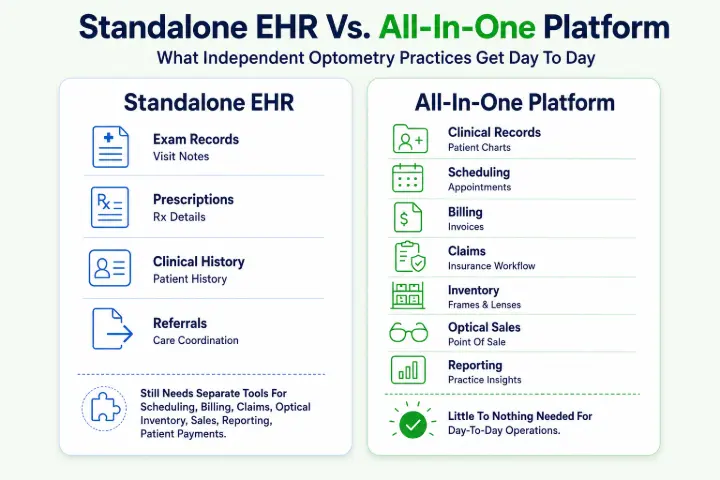
Here is the distinction at a glance before the deeper sections.
System | What it covers | What you still need a separate tool for |
Standalone EHR | Exam records, prescriptions, clinical history, referrals | Scheduling, billing and claims, optical inventory, sales, reporting, patient payments |
EHR with add-ons | Scheduling, billing, and inventory bolted onto the EHR | Constant syncing, paid integrations, multiple logins, vendor coordination |
All-in-one platform | Clinical records, scheduling, billing, claims, inventory, optical sales, reporting | Little to nothing for day-to-day operations |
Signs an Independent Practice Has Outgrown Standalone Tools
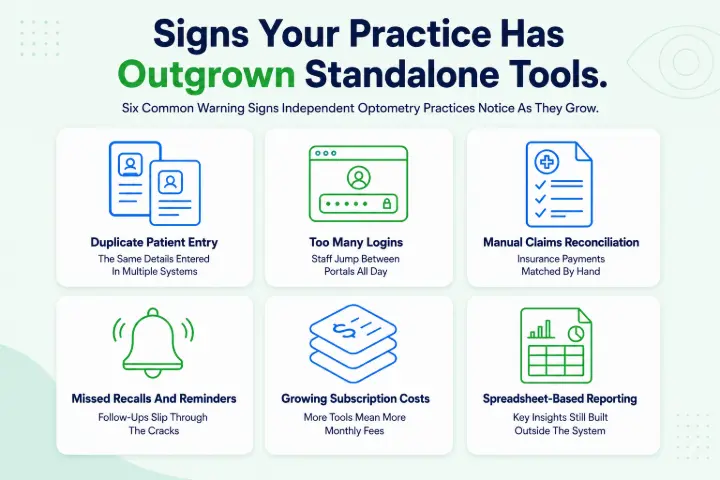
None of these show up overnight. They build until reconciling systems becomes a part-time job nobody applied for. If a few sound familiar, your tools are probably the bottleneck, not your team.
• Staff type the same patient or order details into two or more systems.
• Charting, scheduling, billing, and the optical counter each need their own login.
• Claims and payments get reconciled by hand at the end of the month.
• Recalls and follow-up reminders slip because the data lives in different places.
• The list of software subscriptions and integration fees keeps growing.
• An aging in-office server limits remote access and quietly adds IT cost.
• Reporting means exporting from several tools and stitching the numbers together in a spreadsheet.
Why Independent Optometrists Are Making the Switch
The reasons repeat from practice to practice. They come down to less duplicated work, lower total cost, cleaner data, and tools that used to belong only to the big chains.
One System Instead of a Patchwork
When the exam, the schedule, billing, inventory, and optical sales sit in one platform, the duplicate typing disappears. A patient booked online flows into the chart, the chart feeds the order, and the order feeds inventory and the claim. New staff learn one interface instead of five, with one login to remember instead of a sticky note of passwords. Connected appointment scheduling also means the front desk and the exam room finally look at the same information.
Lower Total Cost Than Stacking Subscriptions
Separate tools each carry their own subscription, and the integrations that glue them together often cost extra on top. One platform replaces that stack. The savings are not only the line items you cancel; it is the admin time nobody spends babysitting connections between vendors. Built-in practice accounting and reporting also keep the financial picture in the same place as the work that drives it.
Line item | Standalone stack | All-in-one |
EHR subscription | Separate bill | Included |
Scheduling tool | Separate bill | Included |
Billing and claims software | Separate bill | Included |
Optical inventory system | Separate bill | Included |
Integrations between tools | Often extra | Built in |
Vendor coordination time | Ongoing | Minimal |
Connected Claims, Inventory, and Patient Records
When the exam, the optical order, the inventory count, and the insurance claim share one record, errors have fewer places to creep in. A prescription is not retyped into the optical order. A frame sold at the counter updates stock and feeds the claim at the same moment. Insurance billing that pulls straight from the exam record tends to go out faster and come back cleaner, and your reporting reflects what actually happened instead of what three systems each thought happened.
Cloud Access and Less IT Burden
A cloud platform frees the practice from a server humming in the back office. Records are reachable from a second location or from home, backups and updates happen without an IT visit, and security is handled at the data-center level. For a practice leaving an on-premise setup, that is one less thing to maintain. It also matters for protecting patient data, which is where strong security infrastructure earns its keep.
Competing With Corporate Chains on a Smaller Budget
Patients now expect the conveniences the big chains offer: online booking, text reminders, fast checkout, and a tidy patient portal. All-in-one tools put those within reach of an independent practice without an enterprise budget or a dedicated IT team. You get to compete on experience, not only on being the friendly local option.
Standalone EHR vs. All-in-One: A Side-by-Side Look
Most of the gaps below come down to one question: do your optical sales, claims, and records live together or apart? Here is how the two approaches compare on the things an independent owner feels every day.
Dimension | Standalone EHR + add-ons | All-in-one practice management |
Data entry | Re-keyed across tools | Entered once, shared everywhere |
Scheduling and reminders | Separate tool, manual sync | Built in, tied to the chart |
Optical sales and inventory | Outside the EHR | In the same system as the exam |
Billing and claims | Exported, then filed elsewhere | Pulled straight from the visit |
Patient engagement | Add-on portal and messaging | Portal, reminders, payments included |
Reporting | Stitched from several exports | One source, real time |
IT and maintenance | Often on-premise, self-managed | Cloud, vendor-managed |
Cost structure | Multiple subscriptions plus integrations | Single subscription |
Scalability | Add more tools to grow | Add locations in one system |
Curious how this looks in practice? See how Got2's EHR features tie the exam, the optical order, and the claim into one record, then picture that same flow on your busiest day.
What Independents Worry About Before Switching (And the Reality)

Most practices that stay on the wrong system stay out of fear, not preference. Here is what usually holds them back, and what the move actually looks like.
Common worry | The reality |
We will lose patient data in the move | Reputable vendors migrate records, history, and claims as a defined process, and you confirm the data before going live. |
Retraining will eat weeks of productivity | One connected interface is usually faster to learn than several disconnected ones, and training is scheduled around your hours. |
The practice will go dark during the switch | Migrations run in stages or in parallel, so the office keeps seeing patients while the new system comes online. |
All systems are basically the same | Connected systems remove the syncing and double entry that bolted-together tools never fully solve. |
It will cost more than it is worth | One subscription often replaces several, and the admin time saved tends to outweigh the switching effort. |
How to Switch Without Disrupting Your Practice
A clean switch is mostly about sequence. Run it in this order and the move feels like a project with a finish line, not a leap into the dark.
1. Audit your current tools. Write down what each one actually does, not what it was sold to do.
2. Map the integrations you cannot lose. Frame catalogs through FramesData, lab ordering throughVisionWeb, your clearinghouse, and your payment processor.
3. Confirm the migration process. Ask how records, exam history, and open claims move over, and who does the work.
4. Schedule training and a go-live window. Pick a low-volume week, not the days before a holiday rush.
5. Run a staged or parallel cutover. Verify that claims go out andinventory management counts match before you switch off the old tools.
6. Test on the free trial first. Use the trial period to run your real workflow with your own data before you commit.
Frequently Asked Questions
1. Is all-in-one optometry practice management software a good fit for a solo or single-doctor practice?
Yes, and solo offices often gain the most. All-in-one is about connecting the steps of a visit and cutting admin, not about practice size. With one doctor and a small team, fewer logins, less double entry, and lighter training free up the hours a solo practice can least afford to lose.
2. Can I keep my existing frame catalog, lab, and clearinghouse integrations after switching?
In most cases, yes. Strong all-in-one platforms connect to the industry standards independent practices rely on: frame catalogs, electronic lab ordering, and insurance clearinghouses. Before you switch, list the connections you depend on and confirm each one is supported, so nothing in your daily workflow breaks.
3. Does all-in-one optometry software meet HIPAA requirements?
Reputable platforms run on HIPAA and HITECH-compliant cloud infrastructure, with patient data encrypted at rest and in transit. The platform provides the compliant foundation, but each practice still maintains its own HIPAA compliance. Staff training, access controls, and internal policies remain your responsibility.
4. What happens to my data if I ever decide to leave the platform?
Your patient records and history stay your data, not the vendor's. Reliable providers support exporting it if you move on. Before signing with anyone, ask exactly how export works and get the data-ownership terms in writing, so you are never locked in by default.
Ready to see a connected practice in action? Try it in your own office with a free trial: no credit card, no long-term contract, and a 30-day money-back guarantee if it is not the right fit. Explore Got2's pricing plans to get started, or call (401) 526-3625 to talk it through first.