Optometry EHR software is a digital system that stores eye exam records, prescriptions, and patient history for eyecare practices. The best options go further and handle scheduling, insurance billing, optical inventory, and payments. Look for optometry-specific charting, integrated claims, supplier catalogs, a patient portal, strong security, and one cloud-based platform that connects every workflow.
Key Takeaways
|
What is optometry EHR software?
Optometry EHR software is an electronic health record system built for eye care. It records exam findings, prescriptions, and patient history, then links them to the front-desk and retail sides of the practice. The goal is simple: one place to run the clinical work and the business around it.
You will see two terms used almost interchangeably: EHR and EMR. An EMR (electronic medical record) is the digital chart for a single practice. An EHR (electronic health record) goes further, sharing data across systems and supporting referrals, patient tools, and connected workflows. For most practices shopping today, the EHR label points to the broader, more connected option.
Here is the part that trips people up. Software designed for family medicine can record a diagnosis, but it does not know what to do with a spectacle prescription, a contact lens fitting, or a frame board. Optometry runs on workflows that general health software simply does not include. That gap is the first thing to screen for.

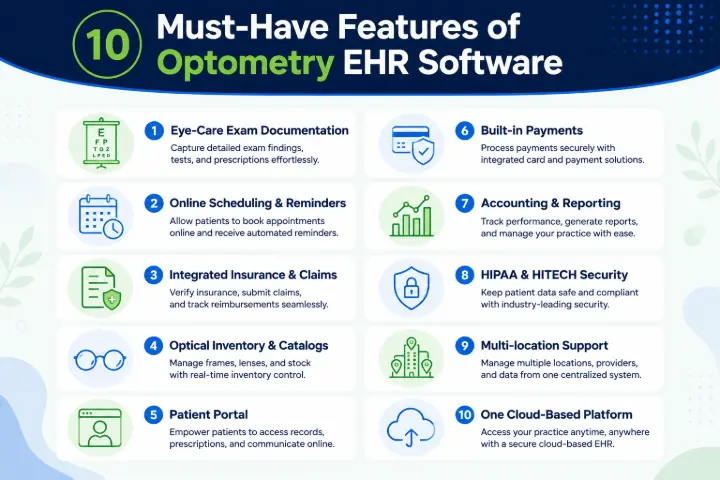
The 10 must-have features in optometry EHR software
Features sell well in a demo. What matters is whether they save your team real minutes every day. Use the quick list below to compare options, then read the detail under each one.
Feature | Why it matters |
1. Eye-care exam documentation | Charts exams the way optometrists actually work, with carry-forward and prescriptions |
2. Online scheduling and reminders | Cuts phone calls and no-shows, fills the calendar automatically |
3. Integrated insurance and claims | Submits electronic claims and posts remittances faster, with fewer errors |
4. Optical inventory and catalogs | Manages frames, lenses, and contacts and connects to supplier catalogs |
5. Patient portal | Lets patients book, fill forms, pay, and share documents online |
6. Built-in payments | Takes card, debit, and HSA payments without a separate terminal |
7. Accounting and reporting | Keeps the books and shows the numbers that drive the practice |
8. HIPAA and HITECH security | Protects patient data and supports your compliance duties |
9. Multi-location support | Runs several sites with shared reporting and inventory transfers |
10. One cloud-based platform | Replaces a stack of disconnected tools with a single login |
Exam documentation built for eye care
Start with the chart, because your team lives in it. Strong electronic health records let you carry exam data forward, run pretesting, write unlimited prescriptions, and generate referral letters without retyping anything. Paperless document storage keeps it all in one record. If charting an exam takes too many clicks, staff will work around the system, and that is where errors creep in.
Online scheduling and automated reminders
Front-desk time is expensive. With online appointment scheduling, patients book based on real-time availability, and the system blocks double bookings for you. Automated SMS, email, and voice reminders cut no-shows, and built-in tele-optometry video calls cover patients who cannot come in. Calendar sync keeps everyone looking at the same day.
Integrated insurance billing and claims
This is where practices lose the most money to busywork. Look for insurance billing and claims with electronic claim submission, remittance posting, and a connection to a clearinghouse. Real-time eligibility checks before the visit reduce surprises and bad debt. The payoff is faster reimbursements and far less rework at month end.
Optical inventory and supplier catalogs
Retail is half of most optometry practices, so the software has to handle it. Good optical inventory management tracks frames, lenses, treatments, and contact lenses, with cycle counts and transfers between locations. Direct catalog imports for frames, electronic lab orders, and contact lens ordering save hours of manual data entry. Costing methods like FIFO and average cost keep the numbers honest.
A patient portal that carries your branding
Patients expect to do things online now. A patient portal lets them request appointments, fill intake forms ahead of time, pay balances, and share documents, all under your practice name and logo. Less paperwork at the desk, fewer phone calls, and a smoother first impression.
Built-in payment processing
A separate card terminal means double entry and reconciliation headaches. in-house payment processing handles credit, debit, and HSA payments inside the same system that holds the sale. Money collected at the counter lines up with the books automatically, so nothing slips between tools.
Practice accounting and clear reporting
You cannot improve what you cannot see. Built-in practice accounting covers bank reconciliation, expenses, and reports, and rolls multiple locations into one consolidated view. The right dashboards show daily sales, outstanding claims, and inventory value at a glance, not after a weekend of spreadsheet work.
HIPAA and HITECH security
Patient data is a target, and compliance is not optional. Check the data security features closely: HIPAA and HITECH compliant hosting, encryption in transit and at rest, two-factor authentication, role-based access, activity logs, and automatic session timeout. Ask whether the vendor signs a Business Associate Agreement. A clear yes is a good sign; a vague answer is not.
Multi-location support and consolidated reporting
Running more than one office multiplies the admin. Look for sales and KPI dashboards that report across every site, plus inter-company rules and inventory transfers between locations. One login should show the whole group, not five separate systems you have to stitch together by hand.
One connected, cloud-based platform
This is the feature that ties the other nine together. When exams, scheduling, billing, inventory, and accounting share one database, you stop paying for four or five tools that barely speak to each other. Cloud access means staff can work from any device, updates happen in the background, and you are not tied to a server in the back room. No long-term contract is a fair thing to expect, too.
Seeing all ten in one place is the whole point. If you would rather run exams, billing, and the optical shop from a single login, take a look at how all-in-one eyecare software brings these features together.

Cloud-based or server-based: which should you choose?
Most practices buying today choose cloud, and for good reason. A server in your office means hardware to buy, an IT person to call, and backups you have to remember. Cloud software shifts that work to the vendor and lets you log in from anywhere.
Cloud-based | Server-based |
Access from any device, any location | Tied to machines in the office or a VPN |
Vendor handles backups and updates | You manage backups, patches, and hardware |
Lower upfront IT cost, monthly subscription | Higher setup cost, ongoing maintenance |
Scales easily across locations | Each new site adds complexity |
Security managed by the provider | Security depends on your own setup |
On-premise can still make sense if you have strong internal IT or a policy that requires local hosting. For most independent and growing practices, though, cloud wins on cost, security, and simplicity.
What does optometry EHR software cost?
Pricing usually runs as a monthly subscription. Across the market, cloud-based optometry platforms commonly fall somewhere between roughly $150 and $500 per provider each month, and all-in setups can run higher once billing and optical modules are added. Treat any single number with care and price your own use case.
A few things move the price:
- Number of providers and locations on the plan.
- Which modules you turn on, such as billing, inventory, or marketing.
- Third-party integrations that need their own accounts, like frame catalogs, lab ordering, and contact lens suppliers.
- Setup work: data migration, training, and onboarding.
- Contract length, and whether there are early-exit fees.
Watch for add-on fees that turn a low headline rate into a large bill. It helps to compare subscription plans that spell out what is included. A free trial, no signup fee, and a money-back window are reasonable to ask for before you spend a dollar.
Common mistakes to avoid when choosing optometry EHR software
A few patterns show up again and again when a purchase goes sideways:
- Forcing a general medical EHR to fit eye care. It can record a visit, but it misses optical and contact lens workflows.
- Buying on price alone. A cheap base rate plus per-feature add-ons often costs more than an all-in plan.
- Ignoring data migration. Moving years of patient records is real work; ask how the vendor handles it before you sign.
- Underestimating training. Software only pays off when staff actually use it well, so onboarding matters.
- Locking into a long contract too early. Test the software with your own workflows first.
- Skipping the security questions. No BAA and no clear backup story are red flags in healthcare.
How to evaluate a vendor before you commit
Once a platform clears the feature list, judge the company behind it. The software is only as good as the support and the move-in.
- Data migration: who moves your records, how long it takes, and what the plan is for zero data loss.
- Training and onboarding: live sessions, help docs, and a real person during go-live week.
- Support and reliability: how you reach support, response times, and uptime expectations.
- Contract terms: month-to-month options, a free trial, and a money-back window.
- Security and compliance: encryption, access controls, audit logs, and a signed Business Associate Agreement.
- Map these against your own goals. A solo practice that wants fewer clicks has different priorities than a three-location group that needs group reporting. Write your must-haves down first, then hold each vendor to them.
Frequently Asked Questions
1. How long does it take to switch to new optometry EHR software?
Most practices move over in a few weeks, not days. The timeline depends on how much patient data you migrate, how many locations you run, and how quickly staff can train. A clear migration plan and a defined go-live date keep it from dragging on, so ask the vendor for both up front.
2. Can one platform handle both the exam room and the optical shop?
Yes, and that is the main reason to choose eye-care software over a generic EHR. A platform built for optometry connects exams and prescriptions to optical inventory, sales, and payments, so a frame or lens sale flows from the chart to the register to the books without re-entering anything.
3. Will optometry EHR software integrate with my existing equipment and suppliers?
It should. Look for connections to frame catalogs, electronic lab ordering, contact lens suppliers, and insurance clearinghouses. Some integrations need their own account with the partner. Confirm which devices and suppliers a platform supports before you buy, since support varies between systems.
4. Is cloud or on-premise optometry EHR better for a small practice?
For most small practices, cloud is the simpler choice. There is no server to maintain, backups and updates are handled for you, and you can log in from any device. On-premise mainly suits practices with strong in-house IT or a specific reason to host data locally.
5. Is a free trial available before I commit?
Yes. Got2 offers a free trial with no signup fee and no credit card required, plus a 30-day money-back guarantee and no long-term contract. Trying the software with your own workflows is the best way to know it fits before you switch.
6. What should I prepare before moving to a new system?
Gather a clean export of your patient and prescription data, list the integrations you rely on, and note the workflows your team uses most. Decide who will lead training, and pick a go-live date during a slower week. A little prep makes the move far smoother.
If these questions match the ones running through your own buying process, the easiest next step is to see the software in action. You can start a free trial with no credit card and no long-term contract, or call the team at (401) 526-3625 to talk through your practice setup.