Software for opticians is an all-in-one platform that runs the clinical and retail sides of an eyecare practice from one place. The best systems combine electronic health records, billing and insurance claims, and inventory in a single login, so patient data, sales, and stock stay connected without manual re-entry.
Key Takeaways • The strongest optician software replaces several disconnected tools with one connected system, which cuts double data entry and reduces errors. • Look for six core building blocks: POS, scheduling, billing and claims, inventory and optical POS, accounting, and patient engagement. • When EHR, billing, and inventory share one database, a prescription written in the exam room flows straight to dispensing, the sale, and the patient record. • Cloud-based platforms let staff work from any location, support multi-site practices, and remove the cost of running on-site servers. • Price depends on practice size, the modules you turn on, and integrations, so weigh total value over the lowest monthly sticker.
|
What is software for opticians?
Software for opticians, often called optical practice management software, is a digital system that handles the daily work of an eyecare business. It tracks appointments, exam records, prescriptions, sales, stock, and payments in one place. Instead of paper charts and a row of separate apps, your team works from a shared record.
A good system links the clinical side to the shop floor. An exam result becomes a electronic health records entry, the prescription turns into a dispensing order, and the sale updates your stock and accounts. Nothing gets typed twice, and the patient file stays current.
Why one connected system beats juggling separate tools
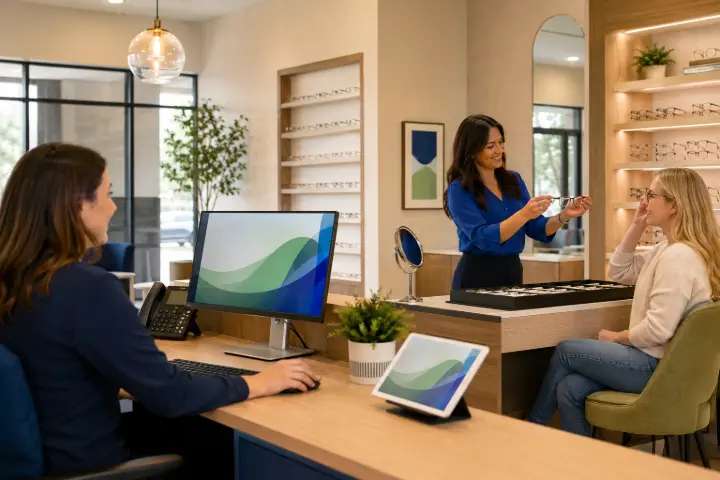
Most practices grow into a patchwork. A clinical record here, a point-of-sale till there, a spreadsheet for frames, and an outside service for claims. Each tool works on its own, but they don't talk to each other. Ask any front-desk team that has keyed the same patient into three screens, and you'll hear the same complaint.
That gap costs more than time. Re-typed data invites typos. Stock counts drift from reality. Reports never quite match because the numbers live in different systems. When appointment scheduling, dispensing, and inventory management run on one platform, the practice sees one version of the truth and the busywork shrinks.
Core features every optician software should have
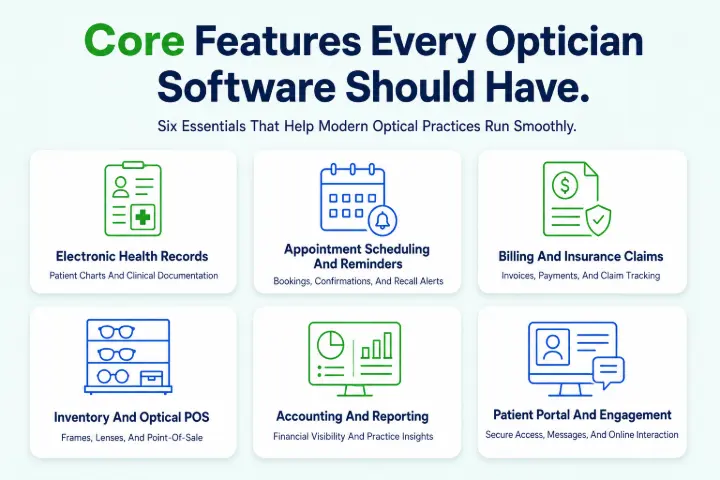
Before you compare products, get clear on the parts that actually run a practice. Six building blocks do most of the heavy lifting.
Electronic health records (EHR)
Your EHR holds exam records, pretesting, prescriptions, referral letters, and patient history. Carry-forward from the last visit saves the doctor real time, and paperless storage keeps documents searchable instead of buried in a filing cabinet.
Appointment scheduling and reminders
Online booking lets patients pick a slot that suits them, while automated SMS, email, and voice reminders cut no-shows. Tele-optometry video calls add a remote option for follow-ups and quick checks.
Billing and insurance claims
Strong insurance billing handles electronic claims, remittance posting, and clearinghouse submission. The goal is simple: get paid faster, with fewer rejected claims and less chasing.
Inventory and optical POS
Optical stock is its own challenge: frames, lenses, lens treatments, contact lenses, and services all move at different speeds. Look for catalog imports, cycle counts, multi-location transfers, and costing methods like FIFO or average cost, tied straight to the point of sale.
Accounting and reporting
Built-in practice accounting keeps the books, reconciles the bank, and consolidates numbers across locations. Live dashboards turn sales and stock data into the few figures owners actually check each week.
Patient portal and engagement
A patient portal lets people fill in forms, request visits, share documents, and pay online before they arrive. Add payment processing for credit, debit, and HSA cards, and the front desk spends less time on admin and more time with patients.
Quick checklist: does the software cover the essentials?
• EHR with prescriptions, carry-forward, and document storage
• Online scheduling with automated reminders
• Electronic insurance claims and remittance
• Optical inventory and point of sale in one ledger
• Accounting with multi-location reporting
• Patient portal and online payments
• Role-based security and audit logging
Why EHR, billing, and inventory belong in one system
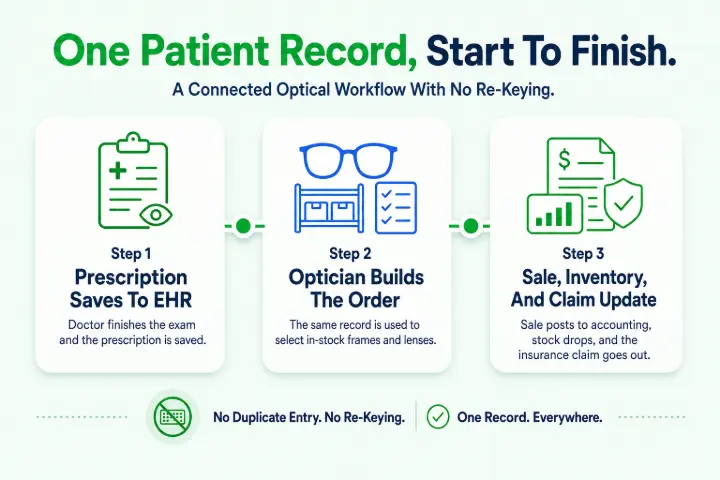
This is where an all-in-one platform earns its keep. When the three core records share a single database, the work flows in a straight line:
1. The doctor finishes the exam and the prescription saves to the EHR.
2. The optician opens the same record and builds the order from in-stock frames and lenses.
3. The sale posts to accounting, inventory drops the items sold, and the claim goes out to insurance.
No exports. No re-keying. One patient, one record, start to finish. Separate systems can be stitched together, but every handoff is a chance for a number to slip. A single platform removes those handoffs, which is the real reason practices move to all-in-one software.
Curious how one connected system would fit your practice? You can see how an all-in-one platform works and try it free, with no credit card and no long-term contract.
Cloud-based vs server-based: which suits your practice?
Where your software lives shapes how your team works day to day. Here is how the two approaches compare.
Factor | Cloud-based | Server-based |
Access | Any device, any location with internet | Tied to on-site computers |
Setup cost | Lower upfront, subscription based | Higher upfront for hardware |
Maintenance | Handled by the provider | Your responsibility or an IT vendor |
Updates | Automatic and included | Manual, often paid |
Multi-location | Built in with shared data | Harder to connect sites |
Backups | Managed in secure data centers | You arrange and test them |
For most growing practices, cloud-based wins on flexibility and cost of ownership. It also makes multi-location work realistic, since every site reads from the same data. Whichever route you pick, check the security features closely: HIPAA-compliant hosting, encryption in transit and at rest, two-factor login, and role-based access should be standard, not extras.
How to choose the right software for your practice
Shortlist with a clear set of questions rather than a feature count. The right fit depends on how you actually run the practice.
• Practice size and growth plans: Will it scale from one site to several without a painful migration?
• Modules you need now: Does it cover EHR, billing, inventory, and accounting, or only part of the picture?
• Optical-specific tools: Does it handle frames, lenses, and contact lens ordering, not just medical records?
• Integrations: Does it connect to your frame catalogs, lab, contact lens supplier, and clearinghouse?
• Compliance: Is the infrastructure HIPAA and HITECH compliant, with a Business Associate Agreement available?
• Support and training: How fast is help, and what onboarding comes included?
• Contract terms: Is there a free trial, and can you leave without a long lock-in?
Common mistakes opticians make when choosing software
A few avoidable slips cause most of the buyer's remorse in this space.
• Buying on price alone. The cheapest plan often skips the integrations or support that save the most time.
• Ignoring the optical side. A strong medical EHR with a weak point of sale still leaves your dispensary stranded.
• Skipping the trial. Demos look tidy. A free trial with your own workflow shows the truth.
• Underrating training. Even good software fails if the team never learns it. Ask what onboarding is included.
• Signing a long contract too early. Short terms and a money-back window protect you while you settle in.
• Overlooking reporting. If owners can't see sales, stock, and claims in one view, decisions stay guesswork.
What does software for opticians cost?
Pricing usually runs on a monthly subscription, and the figure depends on a few things: how many users and locations you have, which modules you switch on, and the integrations you connect. An all-in-one platform can cost more than a single-purpose tool on paper, yet it often costs less than three or four separate subscriptions added together, plus the staff hours those gaps waste.
Watch for the extras that don't show on the headline price: setup fees, per-claim charges, training, and add-on modules. Some platforms keep things simple with no signup fee, no long-term contract, and a free trial so you can test before you commit. To compare plans against your own needs, view our pricing plans, and remember that third-party integrations such as frame data, lab ordering, and contact lens suppliers carry their own accounts.
If you also sell online, factor in whether the system includes a built-in online store, since adding a separate eCommerce tool later is another subscription and another sync to manage.
Frequently Asked Questions
1. What is the difference between optician software and an EHR?
An EHR is one part of optician software, not the whole thing. The EHR stores clinical records and prescriptions, while full optician software also runs scheduling, billing, inventory, point of sale, and accounting. Think of the EHR as the clinical core inside a wider practice management system.
2. Can one system really handle EHR, billing, and inventory?
Yes. All-in-one platforms are built so these records share a single database. A prescription becomes a dispensing order, the sale posts to accounting and drops stock, and the claim goes to insurance, all without re-entry. That shared data is the main reason practices switch to one system.
3. Is cloud-based optician software safe for patient data?
It can be very safe when the provider uses HIPAA and HITECH-compliant hosting, encrypts data in transit and at rest, and offers two-factor login with role-based access. Patient data often sits in secure data centers with managed backups, which many small practices cannot match on their own servers.
4. How long does it take to switch optician software?
It varies with practice size and how much data you migrate. Many cloud systems get a single location live within a few weeks once records are imported and staff are trained. Plan the move during a quieter period and lean on the provider's onboarding to keep disruption low.
5. Do small or single-location practices need all-in-one software?
Often, yes. Smaller teams feel disconnected tools the most, because the same one or two people do the typing across every system. One platform removes that duplicate work and gives owners a clear view of the practice without stitching reports together.
6. Does optician software work for multi-location practices?
Cloud-based all-in-one software is well suited to multi-location groups. It supports consolidated reporting, inter-company rules, and inventory transfers between sites, so each location runs its own day while head office sees the whole picture from one place.
Ready to see EHR, billing, and inventory working in one place? Start a free trial with no credit card required, or call (401) 526-3625 to talk through what your practice needs.